
PulseSensor Waveshare RLCD Prototype
PulseSensor on Waveshare ESP32-S3-RLCD-4.2
Try the monochrome version: Flash a Waveshare ESP32-S3-RLCD-4.2, wire the PulseSensor to the rear 2 x 8 female header, and watch a live pulse dashboard on the 400 x 300 reflective LCD. No WiFi, no IDE after flashing, and no backlight needed.
This software is an educational biofeedback demo and is not intended for medical use.
Flash Your RLCD Board
Plug the Waveshare board into USB-C. Use Chrome, Edge, or Brave on a computer. Mobile browsers do not support WebSerial yet.
First time? After you click Install, your browser will ask which serial port to use. Pick the USB-C serial port for the Waveshare ESP32-S3 board.
What Is Different From The CYD?
The CYD version is a color touchscreen project. This version is intentionally smaller: a black-and-white live PulseSensor dashboard for the Waveshare reflective LCD board.
| CYD tutorial | Waveshare RLCD tutorial |
|---|---|
| ESP32-2432S028 "Cheap Yellow Display" | Waveshare ESP32-S3-RLCD-4.2 |
| 320 x 240 ILI9341 color TFT | 400 x 300 ST7305 monochrome reflective LCD |
| Touch controls, sound, rear LED | First milestone: screen dashboard only |
Purple wire on P3 IO35
|
Purple wire on rear header GP1
|
| Red wire on CYD P3/CN1 power | Red wire on rear header 3V3
|
Wire Your PulseSensor
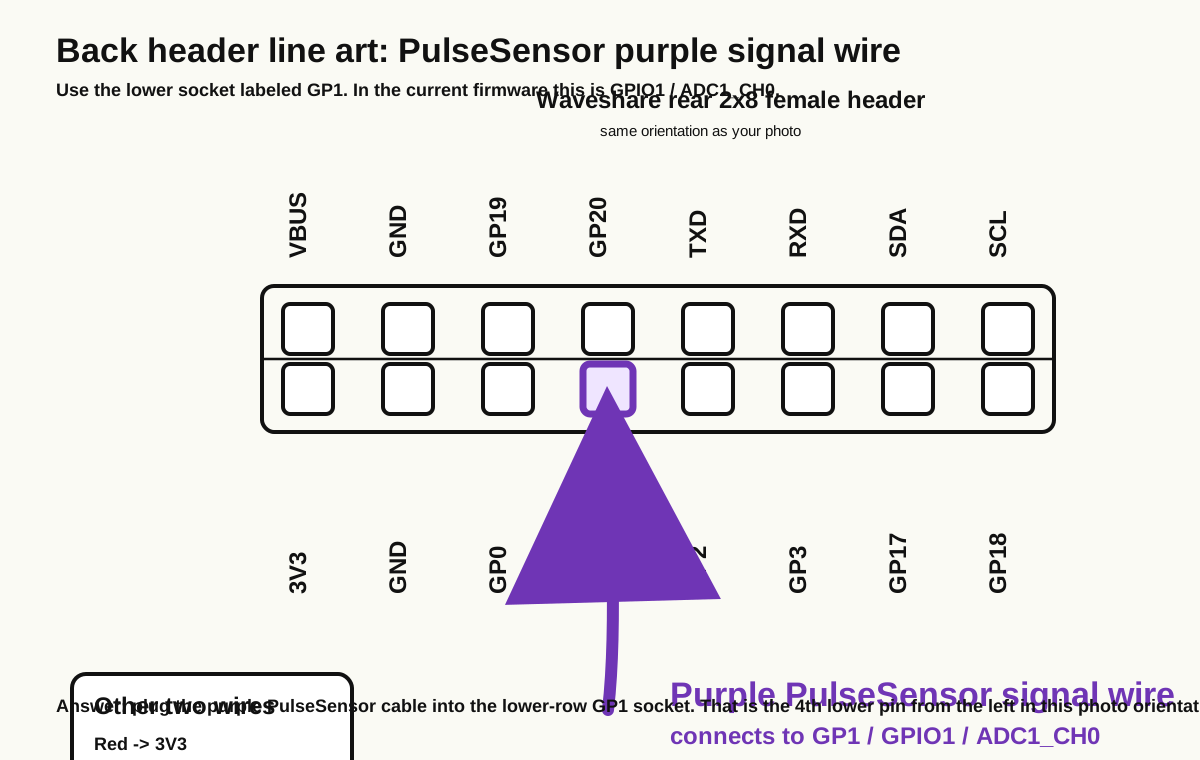
The Waveshare board exposes a rear 2 x 8 female header. Use the printed labels on the board, not cable colors from any other kit.
GP1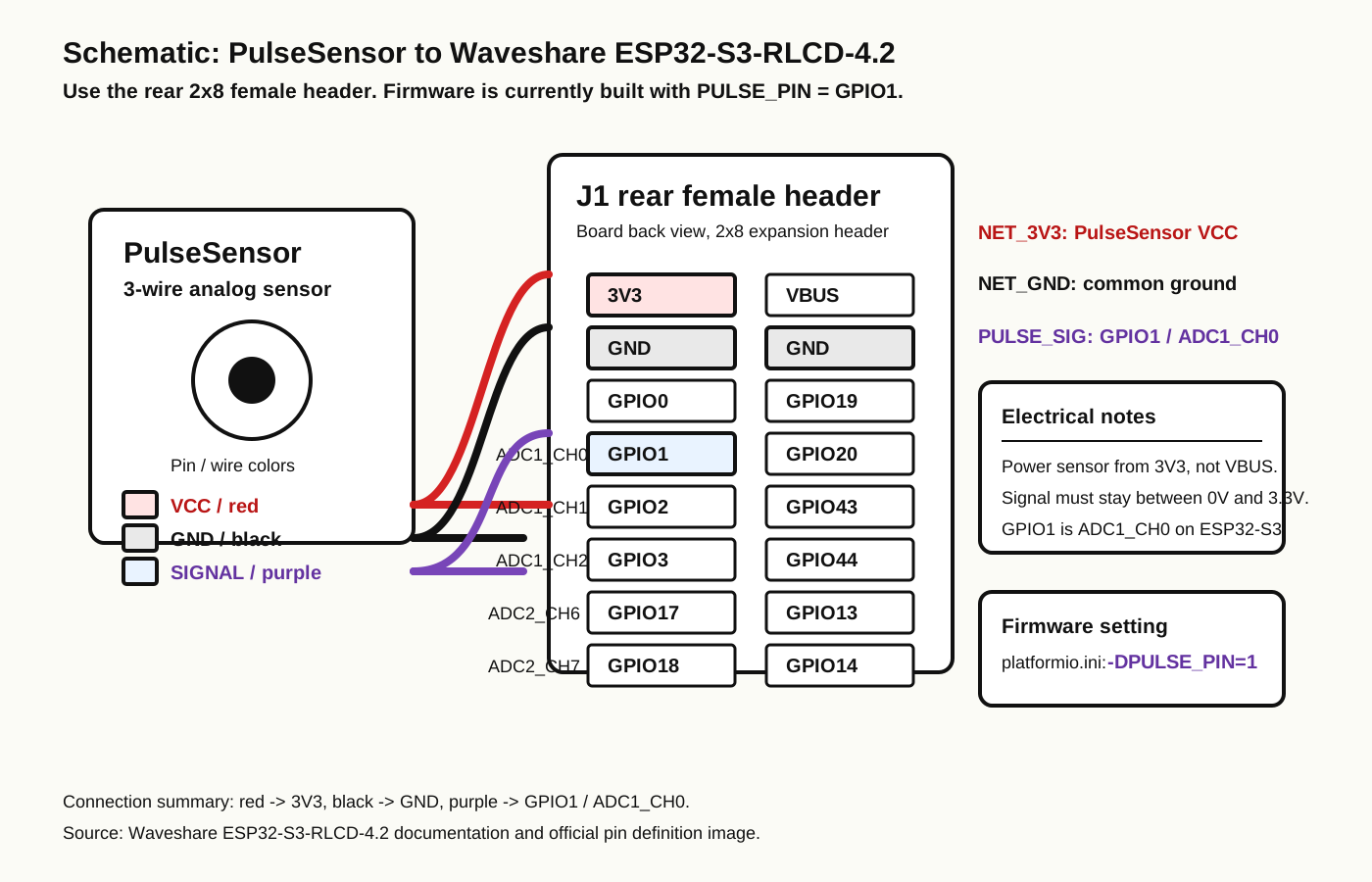
| PulseSensor Wire | Waveshare Rear Header Connection |
|---|---|
| Red (+V) | 3V3 |
| Black (GND) | GND |
| Purple (Signal) |
GP1 / GPIO1 / ADC1_CH0
|
3V3, not VBUS. The firmware reads the PulseSensor signal from GPIO1, so the purple wire must go to the lower-row GP1 socket.What You'll See
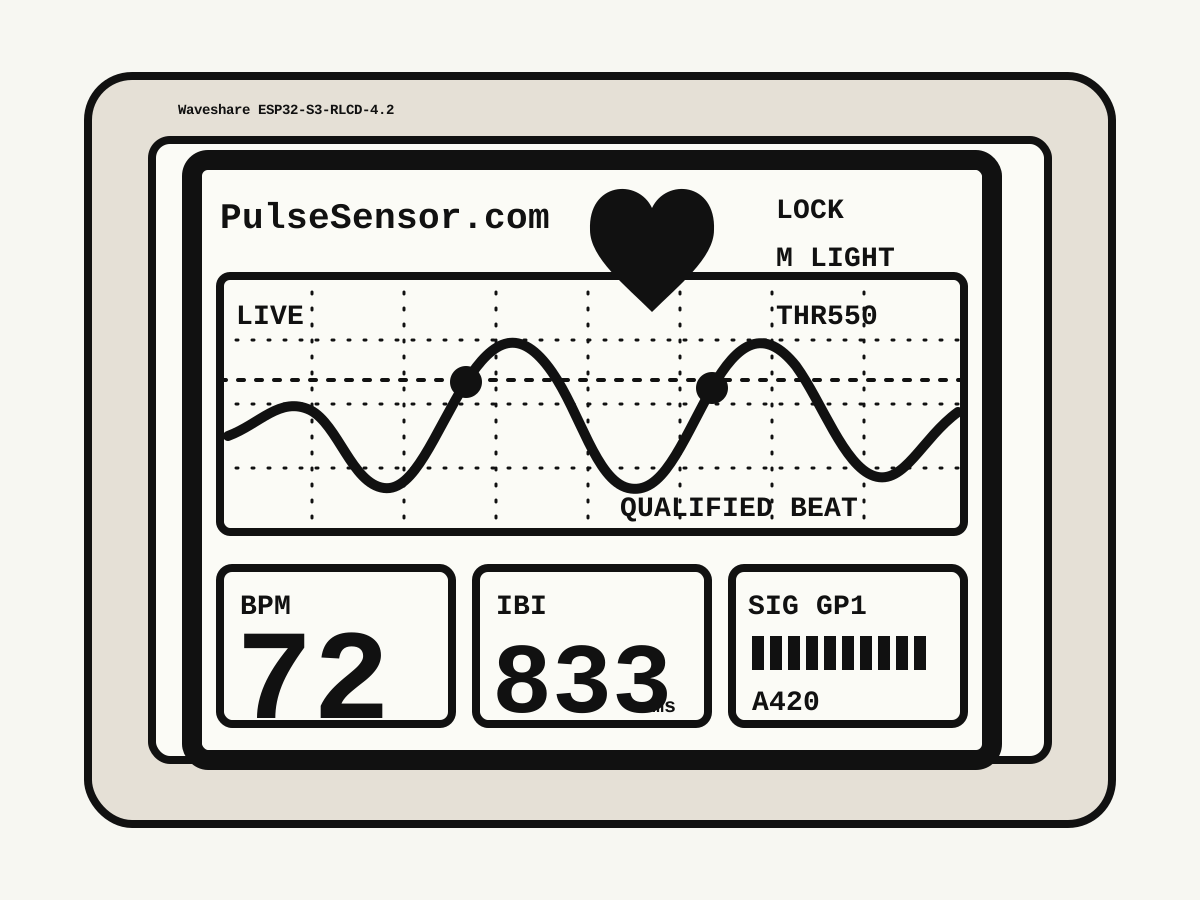
After flashing and wiring, hold the PulseSensor gently against a fingertip or earlobe. The RLCD dashboard shows the same signal state as the CYD firmware, simplified for monochrome.
-
SIGNAL SEARCHwhile the firmware looks for clean beats. -
QUALIFIED BEATonce the quality meter locks. - A live scrolling waveform across the center of the 400 x 300 display.
- Lower panels for BPM, IBI, and SIG GPIO1.
- A pulsing heart in the header when qualified beats arrive.
- Monochrome light/dark mode toggle with the board's
KEY/GPIO18button.
Features
readPulseSensor() remains the first meaningful foreground call.SCK=11, MOSI=12, DC=5, CS=40, RST=41.GPIO1 / ADC1_CH0 on the rear header.KEY/GPIO18 to switch between light and dark display modes.PulseSensor Playground Tie-Ins
Every reading on the display comes from the PulseSensor Playground library, just like the CYD version.
| What you see on screen | Playground call behind it |
|---|---|
| Live waveform | getLatestSample() |
| Beat event / heart pulse | sawStartOfBeat() |
| Inside-beat state | isInsideBeat() |
| BPM number | getBeatsPerMinute() |
| IBI number | getInterBeatIntervalMs() |
| Amplitude meter | getPulseAmplitude() |
| Dotted threshold line | setThreshold(550) |
- Smooth waveform. Clear peaks matching your heartbeat.
- BPM stabilizes. A real reading usually settles after a few clean beats.
- Quality rises. The signal meter fills as the waveform becomes usable.
-
Header changes.
SIGNAL SEARCHbecomesQUALIFIED BEAT.
Quick Troubleshooting
| Problem | Fix |
|---|---|
| Install button does nothing | Use Chrome, Edge, or Brave on a desktop or laptop. Mobile browsers do not support WebSerial yet. |
| No serial port appears | Use a data-capable USB-C cable and plug directly into the computer. |
| Screen stays blank | Confirm this is the Waveshare ESP32-S3-RLCD-4.2. This firmware is for the ST7305 RLCD pins listed below. |
| Flat or clipped waveform | Confirm purple is on GP1, red is on 3V3, and black is on GND. Do not use VBUS for sensor power. |
| BPM stays 0 | Hold the sensor with gentle, steady pressure and give it a few clean beats. Try an earlobe if fingertip readings are jumpy. |
| Display mode is hard to read | Tap the board's KEY/GPIO18 button to switch monochrome light/dark mode. |
Get The Source / Get A Sensor
The Source Code
This version is a standalone PlatformIO Arduino/C++ project for the Waveshare RLCD board.
github.com/yury-g/PulseSensor_RLCD
MIT licensed. This is the first known-working RLCD milestone.
Need a PulseSensor?
The PulseSensor Kit ships with a Stabilizer Ring, color-coded cable, ear clip, finger strap, and vinyl insulation dots.
Hardware details and pinout
The firmware targets the Waveshare ESP32-S3-RLCD-4.2 board with ESP32-S3, 16 MB flash, 8 MB PSRAM, and ST7305 reflective LCD.
PULSE_PIN       = 1
RLCD_SCK        = 11
RLCD_MOSI       = 12
RLCD_DC         = 5
RLCD_CS         = 40
RLCD_RST        = 41
BUTTON_BOOT     = 0
BUTTON_KEY      = 18
PulseSensor Playground expects 10-bit samples, so the firmware calls analogReadResolution(10) during startup.
This software is an educational biofeedback demo and is not intended for medical use.
Made by World Famous Electronics. Source on GitHub. MIT licensed. Heartbeats in your project, lickety-split.